Mac Processes List: 369 macOS Background Processes, Explained
Found mds_stores, WindowServer or mediaanalysisd near the top of Activity Monitor and wondered what it is? Search for it below. Every entry has one plain sentence on what it does and a clear answer on whether to quit it, and we checked each one on a real Mac running macOS 27.0.1: where its file lives, who signed it, and how macOS starts it.

This Mac processes list explains 369 macOS background processes in plain English. Leave Apple’s processes alone: 126 do one job, such as indexing or syncing, and stop on their own, and the other 243 are lasting parts of macOS that it starts again when needed. We timed one restart at 0.1 seconds. Quit only apps you opened yourself.
Look up any process you see in Activity Monitor
Type a process name exactly as Activity Monitor shows it, or a plain word such as Spotlight, iCloud, Wi-Fi or Photos, and the list narrows as you type. A Mac runs hundreds of processes at once, and nearly all of them belong to macOS: ours had 600 running when we checked, and more than 1,000 on a day with more apps open. Each row says what the process does in one sentence, whether to quit it, where its file lives on the Mac and, for 195 of them, Apple’s own one-line description from the macOS manual pages.
| Process | What it does, and where it lives | Quit it? |
|---|---|---|
AccessibilityUIServerAccessibilityrunning | This shows accessibility controls on screen. | Leave itPart of macOS |
accountsdAccountsrunning | This keeps track of the accounts you've added, like iCloud, Google or Exchange. | Leave itPart of macOS |
AddressBookSourceSyncContactsrunning | Contacts is syncing with your accounts. It stops when it's done. Apple’s own description: “Syncs Contacts data with servers” | Let it finishStops on its own |
addressbooksyncdContacts sync | This syncs your contacts. It stops when it's done. | Let it finishStops on its own |
adidAd settingsrunning | This handles the advertising settings for Apple's own apps. | Leave itPart of macOS |
AirPlayUIAgentAirPlayrunning | This shows the AirPlay menu and AirPlay messages. | Leave itPart of macOS |
AirPlayXPCHelperAirPlayrunning | This sends your screen or sound to an AirPlay device. | Leave itPart of macOS |
airportdWi-Firunning | This runs Wi-Fi. Apple’s own description: “airport daemon” | Leave itPart of macOS |
AKAuthorizationRemoteViewServiceSign in with Apple | This shows the Sign in with Apple window. | Leave itPart of macOS |
akdApple Accountrunning | This keeps you signed in to your Apple Account. | Leave itPart of macOS |
amfidApp security checkrunning | This checks that apps are properly signed and haven't been tampered with. Apple’s own description: “The mobile file integrity daemon” | Leave itPart of macOS |
AMPDeviceDiscoveryAgentiPhone syncrunning | This notices when an iPhone or iPad is connected, for syncing in Finder. Apple’s own description: “The discovery service for managing iOS/iPod device discovery” | Leave itPart of macOS |
AMPDevicesAgentiPhone sync | This syncs or backs up your iPhone or iPad with your Mac. It stops when it's done. Apple’s own description: “The devices agent for managing iOS/iPod device syncing” | Let it finishStops on its own |
AMPLibraryAgentMusic library | This keeps your Music and TV libraries up to date. It stops on its own. Apple’s own description: “The media library agent for Music.app and TV.app” | Let it finishStops on its own |
amsaccountsdApp Store accountrunning | This keeps you signed in to the App Store and other Apple media services. | Leave itPart of macOS |
analyticsdAnalyticsrunning | This collects anonymous usage and crash data, if you allowed sharing it with Apple. It's normally quiet. Apple’s own description: “Diagnostics and Usage” | Let it finishStops on its own |
anedNeural Enginerunning | This runs your Mac's Neural Engine, the part of the chip used for AI features. | Leave itPart of macOS |
aneuserdNeural Engine | This runs your Mac's Neural Engine, the part of the chip used for AI features. | Leave itPart of macOS |
apfsdDiskrunning | This looks after your Mac's disk, like its snapshots and free space. Apple’s own description: “APFS volume manager” | Leave itPart of macOS |
appleaccountdApple Accountrunning | This manages your Apple Account on this Mac. | Leave itPart of macOS |
appleeventsdApp automationrunning | This lets apps control each other when you've allowed it, for AppleScript and automation. | Leave itPart of macOS |
appleh13cameradCamerarunning | This runs your Mac's built-in camera. | Leave itPart of macOS |
AppleSpellSpelling | This checks your spelling as you type. | Leave itPart of macOS |
AppSSOAgentWork sign-in | This signs you in to work or school accounts once, for all your apps. | Leave itPart of macOS |
AppSSODaemonWork sign-in | This signs you in to work or school accounts once, for all your apps. | Leave itPart of macOS |
appstoreagentApp Store | The App Store is checking for or installing app updates. It stops when it's done. | Let it finishStops on its own |
appstoredApp Store | The App Store is checking for, downloading or installing apps and updates. It stops when it's done. | Let it finishStops on its own |
apsdPush notificationsrunning | This receives notifications from Apple for your apps. It's normally quiet. Apple’s own description: “Apple Push Notification service daemon” | Leave itPart of macOS |
ARDAgentRemote management | This lets someone manage this Mac remotely, if Remote Management is turned on. Apple’s own description: “Apple Remote Desktop Agent” | Leave itPart of macOS |
AssetCacheLocatorServiceShared downloadsrunning | This looks for a nearby Mac that shares downloads, if your network has one. Apple’s own description: “Service to find local macOS Content Caches” | Leave itPart of macOS |
assistantdSirirunning | This runs Siri. Apple’s own description: “Siri Daemon” | Leave itPart of macOS |
audioaccessorydAirPodsrunning | This handles AirPods features like automatic switching and battery level. | Leave itPart of macOS |
audioanalyticsdSound levelsrunning | This measures sound levels, for things like headphone volume warnings. Apple’s own description: “Audio Diagnostics and Usage Reporting” | Leave itPart of macOS |
AudioComponentRegistrarAudio plug-insrunning | This finds the audio plug-ins on your Mac. It's busy for a moment after you install one. | Let it finishStops on its own |
audiomxdSound routingrunning | This is part of how your Mac handles sound. | Leave itPart of macOS |
authdAdmin passwordrunning | This checks your admin password when something needs permission. | Leave itPart of macOS |
AuthenticationServicesAgentPasskeys and passwordsrunning | This handles Sign in with Apple, passkeys and password autofill. Apple’s own description: “Authentication Services App Login Agent” | Leave itPart of macOS |
autofsdNetwork drivesrunning | This keeps network drives connected when your network changes. Apple’s own description: “daemon to update autofs mounts on network changes” | Leave itPart of macOS |
automountdNetwork drivesrunning | This connects network drives when you open them. Apple’s own description: “automatic mount / unmount daemon for autofs” | Leave itPart of macOS |
avconferencedVideo callsrunning | This handles the sound and video for FaceTime calls. | Leave itPart of macOS |
axassetsdAccessibility downloadsrunning | This downloads files for accessibility features, like voices. It stops when it's done. | Let it finishStops on its own |
BackgroundTaskManagementAgentLogin itemsrunning | This tells you when an app adds itself to open at login or run in the background. Apple’s own description: “User agent which manages notifications about background task processes” | Leave itPart of macOS |
backgroundtaskmanagementdLogin itemsrunning | This keeps track of apps that open at login or run in the background. Apple’s own description: “Daemon which manages policy for background task processes and login items” | Leave itPart of macOS |
backupdTime Machinerunning | Time Machine is backing up your Mac. It stops when the backup is done. Apple’s own description: “Time Machine backup daemon” | Let it finishStops on its own |
backupd-helperTime Machinerunning | Time Machine is getting ready to back up your Mac. It stops when the backup is done. Apple’s own description: “Time Machine backup daemon helper” | Let it finishStops on its own |
bashTerminal | This runs the commands you type in a Terminal window. Apple’s own description: “GNU Bourne-Again SHell” | Leave itPart of macOS |
BiomeAgentActivity historyrunning | This keeps a private history of how you use your apps, for suggestions. It stays on your Mac. Apple’s own description: “Biome operation graph execution launch agent” | Let it finishStops on its own |
biomedActivity historyrunning | This keeps a private history of how you use your apps so macOS can suggest things. It stays on your Mac. Apple’s own description: “Biome operation graph execution daemon” | Let it finishStops on its own |
biomesyncdActivity history syncrunning | This syncs your private suggestion history between your devices. It stops on its own. Apple’s own description: “data synchronization daemon” | Let it finishStops on its own |
biometrickitdTouch IDrunning | This reads your fingerprint for Touch ID. Apple’s own description: “biometric daemon” | Leave itPart of macOS |
birdiCloud Driverunning | iCloud Drive is syncing your files. It stops when everything is up to date. Apple’s own description: “Documents in the Cloud” | Let it finishStops on its own |
bluetoothdBluetoothrunning | This runs Bluetooth for your headphones, mouse and keyboard. | Leave itPart of macOS |
bluetoothuserdBluetooth | This runs Bluetooth features for your account. | Leave itPart of macOS |
BTLEServerBluetooth accessoriesrunning | This talks to Bluetooth accessories like fitness trackers and some keyboards. | Leave itPart of macOS |
BTLEServerAgentBluetooth accessoriesrunning | This talks to Bluetooth accessories like fitness trackers and some keyboards. | Leave itPart of macOS |
caffeinateKeep-awake commandrunning | A Terminal command that keeps your Mac awake. It stops when that command ends. Apple’s own description: “prevent the system from sleeping on behalf of a utility” | Leave itPart of macOS |
calaccessdCalendarrunning | This gives apps access to your calendars. Apple’s own description: “calendar data process” | Leave itPart of macOS |
CalendarAgentCalendar | Calendar is syncing your events. It stops when they're up to date. | Let it finishStops on its own |
callservicesdPhone callsrunning | This handles FaceTime and iPhone calls on your Mac. Apple’s own description: “call server” | Leave itPart of macOS |
cameracapturedCamerarunning | This runs your camera for apps that use it. | Leave itPart of macOS |
cdpdiCloud protectionrunning | This helps protect your iCloud data and account recovery. | Leave itPart of macOS |
cfprefsdApp settingsrunning | This reads and saves the settings for every app. It gets busy when an app saves lots of settings. Apple’s own description: “defaults server” | Leave itPart of macOS |
chronodWidgetsrunning | This keeps your widgets up to date. | Leave itPart of macOS |
clouddiCloudrunning | iCloud is syncing data for your apps, like notes, reminders and settings. It stops when everything is up to date. Apple’s own description: “CloudKit” | Let it finishStops on its own |
cloudpairdBluetooth pairing sync | This shares AirPods and other Bluetooth pairings across your devices through iCloud. Apple’s own description: “cloudpaird daemon” | Leave itPart of macOS |
cloudphotodiCloud Photosrunning | Photos is uploading or downloading pictures with iCloud Photos. It stops when everything is in sync. Apple’s own description: “The macOS iCloud Photos agent” | Let it finishStops on its own |
cloudtelemetrydiCloud reportsrunning | This sends iCloud problem reports, if you allowed it. Apple’s own description: “Cloud Telemetry Daemon” | Let it finishStops on its own |
com.apple.accessibility.mediaaccessibilitydCaptions | This handles captions and audio descriptions for videos. | Leave itPart of macOS |
com.apple.AmbientDisplayAgentTrue Tonerunning | This adjusts your screen's colour to the light around you. | Leave itPart of macOS |
com.apple.appkit.xpc.openAndSavePanelServiceOpen and Save windowrunning | This draws the Open and Save windows for your apps. | Leave itPart of macOS |
com.apple.CallKit.CallDirectoryCaller ID | This shows caller ID and blocked numbers from apps, for calls on your Mac. | Leave itPart of macOS |
com.apple.CloudDocs.iCloudDriveFileProvideriCloud Driverunning | iCloud Drive is syncing your files. It stops when everything is up to date. | Let it finishStops on its own |
com.apple.cmio.registerassistantserviceCamera setuprunning | This sets up cameras and video devices for apps. Apple’s own description: “CoreMediaIO DAL Registration Assistant Service” | Leave itPart of macOS |
com.apple.CodeSigningHelperApp signature checkrunning | This checks that an app really comes from its developer. It finishes quickly. | Let it finishStops on its own |
com.apple.FaceTime.FTConversationServiceFaceTime | This handles group FaceTime and SharePlay. | Leave itPart of macOS |
com.apple.geodMaps datarunning | This downloads map data for Maps, Weather and Find My. It stops when the download is done. | Let it finishStops on its own |
com.apple.hiservices-xpcserviceApp servicesrunning | This helps apps with things like the Services menu and accessibility. | Leave itPart of macOS |
com.apple.MapKit.SnapshotServiceMap pictures | This draws small map pictures for apps. It finishes quickly. | Let it finishStops on its own |
com.apple.MobileInstallationHelperServiceInstalling | This installs an app. It stops when it's done. | Let it finishStops on its own |
com.apple.MobileSoftwareUpdate.UpdateBrainServiceSoftware Update | macOS is preparing an update. It stops when it's done. | Let it finishStops on its own |
com.apple.Passwords.MenuBarExtraPasswordsrunning | This is the Passwords icon in your menu bar. | Leave itPart of macOS |
com.apple.quicklook.ThumbnailsAgentFile previewsrunning | This makes thumbnail pictures of your files. It stops once they're made. | Let it finishStops on its own |
com.apple.Safari.SafeBrowsing.ServiceSafe Browsing | This updates Safari's list of dangerous websites. It stops on its own. Apple’s own description: “Safari Safe Browsing Service” | Let it finishStops on its own |
com.apple.StreamingUnzipServiceUnpacking | This unpacks an app or update while it downloads. It stops when it's done. | Let it finishStops on its own |
com.apple.Virtualization.VirtualMachineVirtual machine | This is a virtual machine: another system, like Linux or a copy of macOS, running inside your Mac for an app such as Docker. Closing the app that started it stops it. | Leave itPart of macOS |
com.apple.WebKit.GPUWeb page graphics | This draws video and graphics for web pages. Closing busy tabs calms it down. | Leave itPart of macOS |
com.apple.WebKit.NetworkingWeb page loading | This loads web pages for Safari and other apps. | Leave itPart of macOS |
com.apple.WebKit.WebContentA web page | This is a web page open in Safari or another app. A busy one is usually a page with video or ads, and closing that tab calms it down. | Leave itPart of macOS |
CommCenteriPhone calls and textsrunning | This handles calls and text messages that come through your iPhone. Apple’s own description: “Provides functionality to allow the Mac to make and receive phone calls” | Leave itPart of macOS |
commerceApp Store purchasesrunning | This handles App Store purchases. It's normally quiet. | Leave itPart of macOS |
configdNetwork settingsrunning | This keeps track of your network and system settings. Apple’s own description: “System Configuration Daemon” | Leave itPart of macOS |
contactsdContactsrunning | This gives apps access to your contacts. Apple’s own description: “contactsd daemon” | Leave itPart of macOS |
containermanagerdApp storagerunning | This sets up private storage folders for your apps. Apple’s own description: “Application and plug-in containerization management daemon” | Leave itPart of macOS |
containermanagerd_systemApp storagerunning | This sets up private storage folders for apps. Apple’s own description: “System container directory management daemon” | Leave itPart of macOS |
ContainerMetadataExtractorApp inforunning | This reads information about newly installed apps. It finishes quickly. | Let it finishStops on its own |
ContextStoreAgentSuggestionsrunning | This keeps track of what you're doing so macOS can make suggestions. It stays on your Mac. | Let it finishStops on its own |
contextstoredSuggestionsrunning | This keeps track of what you're doing so macOS can make suggestions. It stays on your Mac. | Let it finishStops on its own |
ContinuityCaptureAgentiPhone as webcamrunning | This lets you use your iPhone as a webcam. | Leave itPart of macOS |
ControlCenterControl Centerrunning | This runs Control Center and many of the icons in your menu bar. Apple’s own description: “macOS Control Center” | Leave itPart of macOS |
coreaudiodSoundrunning | This plays all sound on your Mac. | Leave itPart of macOS |
coreauthdTouch ID and passwordsrunning | This handles Touch ID and password prompts. Apple’s own description: “LocalAuthentication daemon and agent” | Leave itPart of macOS |
corebrightnessdScreen brightnessrunning | This adjusts your screen brightness and Night Shift. Apple’s own description: “corebrightnessd daemon” | Leave itPart of macOS |
CoreDeviceServiceConnected devicesrunning | This talks to connected iPhones and iPads, mostly for Xcode and Finder. | Leave itPart of macOS |
coreduetdBackground schedulerrunning | This helps macOS decide when to run background jobs and which apps to suggest. | Leave itPart of macOS |
CoreLocationAgentLocationrunning | This asks you before an app can use your location. Apple’s own description: “manages location authorization prompts” | Leave itPart of macOS |
coreservicesdCore servicesrunning | This helps apps open files and find each other. | Leave itPart of macOS |
CoreServicesUIAgentSecurity promptsrunning | This shows messages like "Are you sure you want to open this app?" | Leave itPart of macOS |
corespeechdSiri listeningrunning | This listens for "Siri" and handles voice features. | Leave itPart of macOS |
corespeechd_systemSiri listeningrunning | This listens for "Siri" and handles voice features. | Leave itPart of macOS |
corespotlightdSpotlightrunning | Spotlight is indexing what's inside your apps, like notes and messages, so search can find them. It stops on its own. | Let it finishStops on its own |
coresymbolicationdCrash reports | This turns crash reports into something readable. It's busy for a moment after a crash. Apple’s own description: “daemon to manage debug symbols cache” | Let it finishStops on its own |
countrydRegionrunning | This works out which country your Mac is in, for things like Wi-Fi rules. Apple’s own description: “Listens for country-level information and makes that available to users of RegulatoryDomain.framework” | Leave itPart of macOS |
CrashReporterSupportHelperCrash reportsrunning | This helps macOS write crash reports. It stops on its own. Apple’s own description: “Provides functionality in support of CrashReporterSupport” | Let it finishStops on its own |
cronScheduled tasksrunning | This runs tasks that were set up to run at set times. Apple’s own description: “daemon to execute scheduled commands (Vixie Cron)” | Leave itPart of macOS |
ctkahpSmart cardsrunning | This handles smart cards and security keys, like a work ID card. Apple’s own description: “SmartCard Agent” | Leave itPart of macOS |
ctkdSmart cardsrunning | This handles smart cards and security keys, like a work ID card. Apple’s own description: “SmartCard daemon/agent” | Leave itPart of macOS |
cupsdPrinting | This sends documents to your printer. It stops when printing is done. Apple’s own description: “cups scheduler” | Let it finishStops on its own |
CursorUIViewServicePointerrunning | This draws pointer effects, like the big pointer when you shake the mouse. | Leave itPart of macOS |
CVMServerGraphics setuprunning | This prepares graphics for apps that use older graphics code. It stops on its own. Apple’s own description: “Mac OS X Core Virtual Machine Server” | Let it finishStops on its own |
dasdBackground schedulerrunning | This decides when background jobs like backups and updates run, usually when your Mac is idle. | Leave itPart of macOS |
deletedFreeing spacerunning | macOS is clearing out caches and old files it doesn't need, to free up space. It stops on its own. Apple’s own description: “The purgeable space / cache management daemon” | Let it finishStops on its own |
diagnosticdDiagnostics | This sends your Mac's activity log to a tool that is watching it, like Console. It stops when that tool is closed. Apple’s own description: “unified logging system diagnostic daemon” | Let it finishStops on its own |
diskarbitrationdDisksrunning | This notices when disks and USB drives are plugged in and opens them. Apple’s own description: “disk arbitration daemon” | Leave itPart of macOS |
diskimagesiodDisk imagesrunning | This opens a disk image (.dmg) file. It's busy while one is being read, then stops. Apple’s own description: “Handles I/O for disk images” | Let it finishStops on its own |
diskmanagementdDisk Utility | This helps Disk Utility change a disk. It stops when it's done. | Let it finishStops on its own |
DiskUnmountWatcherDisk ejectingrunning | This watches for disks being ejected. Apple’s own description: “watches for disk unmount and remove cached credentials” | Leave itPart of macOS |
distnotedApp messagesrunning | This passes messages between apps. It's normally quiet; if it stays busy, one of your apps is usually the cause. Apple’s own description: “distributed notification server” | Leave itPart of macOS |
dmdDevice management | This applies device rules, like Screen Time limits or settings from your school or company. | Leave itPart of macOS |
DockDockrunning | This runs the Dock at the bottom of your screen. Apple’s own description: “Provides the Dock interface for the system” | Leave itPart of macOS |
donotdisturbdFocusrunning | This runs Focus and Do Not Disturb. Apple’s own description: “do dot disturb daemon” | Leave itPart of macOS |
duetexpertdApp predictionsrunning | This predicts which apps you'll want next, for suggestions in Spotlight and elsewhere. | Let it finishStops on its own |
eligibilitydFeature availabilityrunning | This checks which features your Mac and region can use. Apple’s own description: “eligibilityd - computes feature availability” | Leave itPart of macOS |
endpointsecuritydSecurity software | This lets security software watch for threats. Apple’s own description: “Daemon that manages user space components of the EndpointSecurity (ES) subsystem” | Leave itPart of macOS |
eventkitsyncdCalendar sync | This syncs your calendars and reminders. It stops when it's done. | Let it finishStops on its own |
extensionkitserviceApp add-ons | This runs small add-ons that apps provide, like widgets and share options. | Leave itPart of macOS |
fairplaydMedia protectionrunning | This unlocks music, films and apps you've bought so they can play. | Leave itPart of macOS |
familycircledFamily Sharingrunning | This runs Family Sharing. | Leave itPart of macOS |
filecoordinationdFile safetyrunning | This stops two apps from changing the same file at the same time. Apple’s own description: “system-wide file access coordination” | Leave itPart of macOS |
fileproviderdCloud filesrunning | macOS is syncing files with iCloud Drive or another cloud folder like Dropbox or Google Drive. It stops when your files are up to date. Apple’s own description: “Part of File Coordination” | Let it finishStops on its own |
FinderFinderrunning | Finder shows your files and desktop. It restarts itself if closed. | Leave itPart of macOS |
findmydevice-user-agentFind Myrunning | This lets you find this Mac with Find My. Apple’s own description: “Find My Mac user agent” | Leave itPart of macOS |
findmydevicedFind Myrunning | This lets you find this Mac with Find My. Apple’s own description: “Find My Mac daemon” | Leave itPart of macOS |
findmylocateagentFind Myrunning | This finds your devices and people for Find My. Apple’s own description: “User agent for the Find My subsystem” | Leave itPart of macOS |
followupdSetup remindersrunning | This shows reminders to finish setting something up, like your Apple Account. | Leave itPart of macOS |
fontdFontsrunning | This manages the fonts on your Mac. It can get busy after you install fonts, then settles. Apple’s own description: “Mac OS X system font registration manager” | Let it finishStops on its own |
fontservicesdFonts | This manages the fonts on your Mac. | Leave itPart of macOS |
fontworkerFontsrunning | This prepares fonts for apps. It can get busy after you install fonts, then settles. Apple’s own description: “Mac OS X system font registration and validation daemon” | Let it finishStops on its own |
fseventsdFile trackingrunning | macOS is keeping track of files that changed. It calms down when copying or installing finishes. | Let it finishStops on its own |
fskitdDisk formatsrunning | This lets your Mac read disks in other formats. Apple’s own description: “FSKit mount manager and mount support” | Leave itPart of macOS |
gamecontrolleragentdGame controllersrunning | This handles game controllers. | Leave itPart of macOS |
gamecontrollerdGame controllersrunning | This handles game controllers. Apple’s own description: “game controller daemon” | Leave itPart of macOS |
gamepolicydGame Moderunning | This turns on Game Mode when you play a game full screen, so the game gets priority. Apple’s own description: “Optimizes system performance for running game processes” | Leave itPart of macOS |
generativeexperiencesdApple Intelligencerunning | This runs Apple Intelligence features like Writing Tools. Apple’s own description: “A daemon that powers generative experience” | Leave itPart of macOS |
geoanalyticsdMaps reports | This sends anonymous Maps reports, if you allowed it. It stops on its own. | Let it finishStops on its own |
geodMaps data | This downloads map data for Maps, Weather and Find My. It stops when the download is done. | Let it finishStops on its own |
GSSCredNetwork sign-in | This keeps you signed in to company or school networks. Apple’s own description: “manages GSS-API credentials” | Leave itPart of macOS |
heardHearing featuresrunning | This runs hearing features for headphones and hearing devices. | Leave itPart of macOS |
helpdHelp pages | This builds the help pages for your apps. It's busy for a moment after updates. Apple’s own description: “Help Daemon” | Let it finishStops on its own |
hiddKeyboard and mouse | This handles your keyboard, mouse and trackpad. Apple’s own description: “The HID library userland daemon” | Leave itPart of macOS |
homedHomerunning | This connects your Mac to your smart home accessories. Apple’s own description: “home services daemon” | Leave itPart of macOS |
icddScanners and camerasrunning | This finds scanners and cameras for Image Capture. Apple’s own description: “ImageCapture Discovery Daemon” | Leave itPart of macOS |
iconservicesagentIcons | This draws app and file icons. It gets busy after updates, then settles. Apple’s own description: “agent responsible for generating icon images from the resources provided in application bundles and by the system” | Let it finishStops on its own |
iconservicesdIcons | This draws app and file icons. It gets busy after updates, then settles. Apple’s own description: “deamon responsible for managing the shared icon cache” | Let it finishStops on its own |
identityservicesdMessages and FaceTimerunning | This connects Messages and FaceTime to your Apple Account. | Leave itPart of macOS |
imagentMessagesrunning | This sends and receives your iMessages. | Leave itPart of macOS |
imageplaygrounddImage Playground | This makes images for Image Playground and Genmoji. Apple’s own description: “imageplaygroundd daemon” | Leave itPart of macOS |
IMAutomaticHistoryDeletionAgentMessages cleanup | This deletes old messages if you've set Messages to keep them for a limited time. | Let it finishStops on its own |
IMDPersistenceAgentMessages | This saves your messages on your Mac. It can get busy when lots of messages arrive at once, then settles. | Let it finishStops on its own |
imklaunchagentTypingrunning | This starts input methods for typing emoji and other languages. | Leave itPart of macOS |
installdInstallingrunning | An app or update is being installed. It stops when it's done. Apple’s own description: “macOS software installation daemon” | Let it finishStops on its own |
installerInstaller | An installer is running. It stops when it's done. Apple’s own description: “system software and package installer tool” | Let it finishStops on its own |
intelligencecontextdApple Intelligencerunning | This gives Apple Intelligence the context it needs, like what's on screen when you ask. Apple’s own description: “This is a daemon that retrieves contextual information from various sources” | Leave itPart of macOS |
intelligenceflowdApple Intelligencerunning | This handles your Apple Intelligence requests. Apple’s own description: “A daemon that manages sessions for intelligence services” | Leave itPart of macOS |
IntelligencePlatformComputeServiceApple Intelligencerunning | Apple Intelligence is processing information on your Mac. It works mostly when your Mac is idle, and stops on its own. | Let it finishStops on its own |
intelligenceplatformdApple Intelligencerunning | Apple Intelligence is organising information on your Mac so it can help you. It works mostly when your Mac is idle, and stops on its own. Apple’s own description: “A daemon that analyzes content on the device to build and query a general purpose knowledge graph” | Let it finishStops on its own |
itunesclouddMusic library sync | This syncs your Music library with iCloud. It stops when everything is up to date. | Let it finishStops on its own |
itunesstoredApple media purchases | This handles purchases from the iTunes Store, Apple Music and Apple TV. | Leave itPart of macOS |
kdcSharing sign-inrunning | This handles secure sign-in between Macs, for things like file and screen sharing. Apple’s own description: “Kerberos 5 server” | Leave itPart of macOS |
kernel_taskmacOS cooling | This is the heart of macOS. When your Mac gets hot, it uses this to slow things down so it can cool off. | Leave itPart of macOS |
KernelEventAgentDisk warningsrunning | This shows warnings, like when a disk was removed without ejecting it. Apple’s own description: “utility to provide user interface on behalf of the kernel” | Leave itPart of macOS |
kernelmanagerdDriversrunning | This loads the drivers for your hardware and accessories. | Leave itPart of macOS |
keybagdEncryption | This looks after the keys that keep your files encrypted. | Leave itPart of macOS |
keyboardservicesdTyping suggestions | This learns words you type, for predictions and autocorrect. It stays on your Mac. | Leave itPart of macOS |
Keychain Circle NotificationiCloud Keychainrunning | This shows iCloud Keychain messages, like approving a new device. Apple’s own description: “Part of iCloud Keychain syncing” | Leave itPart of macOS |
knowledge-agentSuggestionsrunning | This keeps a private record of how you use your Mac so it can suggest things. It stays on your Mac and settles on its own. | Let it finishStops on its own |
KonaSynthesizerSpoken voices | This reads text out loud, for Siri and read-aloud features. It stops when it's done talking. | Let it finishStops on its own |
languageassetdLanguage filesrunning | This downloads language files for dictation, translation and typing. It stops when it's done. | Let it finishStops on its own |
launchdmacOSrunning | This starts and stops everything on your Mac. Apple’s own description: “System wide and per-user daemon/agent manager” | Leave itPart of macOS |
launchservicesdApp listrunning | This keeps track of your apps and which app opens which kind of file. | Leave itPart of macOS |
linkdShortcuts actionsrunning | This lets Siri and Shortcuts use actions from your apps. Apple’s own description: “daemon that handles interaction with applications via their App Intents interfaces” | Leave itPart of macOS |
liveactivitiesdLive Activitiesrunning | This shows Live Activities from your iPhone, like a delivery or a game score. | Leave itPart of macOS |
LocalAuthenticationRemoteServiceTouch ID promptsrunning | This shows Touch ID and password prompts for apps. | Leave itPart of macOS |
localspeechrecognitionDictation | This turns speech into text on your Mac, for dictation and apps that listen. It stops when the listening stops. | Let it finishStops on its own |
locationdLocationrunning | This works out where your Mac is for apps you've allowed, like Maps and Weather. Apple’s own description: “location services daemon” | Leave itPart of macOS |
logdSystem logrunning | This writes your Mac's activity log. It gets busy when an app writes too much to it. Apple’s own description: “unified logging system daemon” | Leave itPart of macOS |
loginTerminal sessionrunning | This signs you in when a Terminal window opens. Apple’s own description: “log into the computer” | Leave itPart of macOS |
logindLogin sessionsrunning | This keeps track of who is logged in. | Leave itPart of macOS |
loginwindowYour loginrunning | This runs the login screen and keeps you logged in. Closing it would log you out. | Leave itPart of macOS |
lsdApp listrunning | This keeps track of which app opens which kind of file. | Leave itPart of macOS |
MacinTalkAUSPSpoken voices | This reads text out loud with a system voice. It stops when it's done talking. | Let it finishStops on its own |
maildMail | Mail is downloading or sorting your email in the background. It stops when your mailbox is up to date. | Let it finishStops on its own |
managedcorespotlightdSpotlight | This is part of Spotlight, the search on your Mac. It stops on its own. | Let it finishStops on its own |
mdbulkimportSpotlightrunning | Spotlight is reading a big batch of files so search can find them. It stops on its own. | Let it finishStops on its own |
mDNSResponderNetworkrunning | This finds websites and devices on your network. It gets busy when apps make lots of connections. Apple’s own description: “Multicast and Unicast DNS daemon” | Leave itPart of macOS |
mDNSResponderHelperNetworkrunning | This helps find websites and devices on your network. Apple’s own description: “mDNS privilege separation helper” | Leave itPart of macOS |
mdsSpotlightrunning | Spotlight, the search on your Mac, is sorting your files so you can find them. This is normal after an update or when you add lots of files, and it stops on its own. Apple’s own description: “metadata server” | Let it finishStops on its own |
mds_storesSpotlightrunning | Spotlight, the search on your Mac, is sorting your files so you can find them. This is normal after an update or when you add lots of files, and it stops on its own. | Let it finishStops on its own |
mdworkerSpotlight | Spotlight, the search on your Mac, is sorting your files so you can find them. This is normal after an update or when you add lots of files, and it stops on its own. Apple’s own description: “metadata server worker” | Let it finishStops on its own |
mdworker_sharedSpotlightrunning | Spotlight, the search on your Mac, is sorting your files so you can find them. This is normal after an update or when you add lots of files, and it stops on its own. | Let it finishStops on its own |
mdwriteSpotlightrunning | This is part of Spotlight, the search on your Mac. It finishes quickly. | Let it finishStops on its own |
mediaanalysisdPhotosrunning | macOS is looking through your photos and videos so you can search for what's in them, like "dog" or "beach". It stops on its own, mostly when your Mac is idle. | Let it finishStops on its own |
mediaremotedNow Playingrunning | This controls what's playing, for the Now Playing menu and media keys. | Leave itPart of macOS |
MIDIServerMusic keyboards | This connects music keyboards and other MIDI devices. Apple’s own description: “Agent supporting CoreMIDI framework” | Leave itPart of macOS |
migrationhelperMoving your datarunning | This helps move your data after a macOS update or Migration Assistant. It stops when it's done. | Let it finishStops on its own |
mlhostdOn-device AI | This runs on-device AI models for apps. It stops when they're done. | Let it finishStops on its own |
mobileassetdExtra downloadsrunning | macOS is downloading extra parts it needs, like voices, fonts or dictionaries. It stops when the download finishes. | Let it finishStops on its own |
mobiletimerdAlarms and timersrunning | This runs alarms and timers from the Clock app. Apple’s own description: “timer agent” | Leave itPart of macOS |
modelcatalogdAI modelsrunning | This keeps track of which on-device AI models are installed. Apple’s own description: “A daemon that stores base models and adapters” | Leave itPart of macOS |
modelmanagerdApple Intelligencerunning | This loads the on-device AI models when an app uses Apple Intelligence. Apple’s own description: “Model Management Daemon” | Leave itPart of macOS |
MTLAssetUpgraderDGraphics setup | This updates graphics files after a macOS update. It stops when it's done. Apple’s own description: “Metal asset upgrader daemon” | Let it finishStops on its own |
MTLCompilerServiceGraphics setup | macOS is preparing graphics for your apps. It's busy for a while after an update, then stops. | Let it finishStops on its own |
nanoappregistrydApple Watch | This connects your Mac to your Apple Watch. | Leave itPart of macOS |
nanotimekitcompaniondApple Watch | This connects your Mac to your Apple Watch. | Leave itPart of macOS |
navdLeave-time alerts | This works out when you should leave for calendar events, using traffic from Maps. Apple’s own description: “Time to Leave Daemon” | Leave itPart of macOS |
neagentVPNrunning | This runs VPN and network filter apps. Apple’s own description: “Host process for Network Extension plugins” | Leave itPart of macOS |
nearbydNearby devicesrunning | This finds nearby Apple devices for things like AirDrop and Find My. Apple’s own description: “The proximity daemon” | Leave itPart of macOS |
nehelperVPNrunning | This helps set up VPNs and network filters. Apple’s own description: “Helper daemon for the Network Extension framework” | Leave itPart of macOS |
nesessionmanagerVPNrunning | This keeps your VPN or network filter connected. Apple’s own description: “Daemon responsible for running and managing Network Extension sessions” | Leave itPart of macOS |
netbiosdWindows network namesrunning | This finds Windows computers and shared folders on your network. Apple’s own description: “NetBIOS protocol daemon” | Leave itPart of macOS |
networkserviceproxyPrivate Relayrunning | This runs iCloud Private Relay, which hides your internet address in Safari. Apple’s own description: “Transparent network proxy for Apple system services” | Leave itPart of macOS |
newsdApple News | This updates Apple News in the background. It stops on its own. | Let it finishStops on its own |
NotificationCenterNotificationsrunning | This shows your notifications and widgets. Apple’s own description: “Notification Center service for display notifications” | Leave itPart of macOS |
notifydSystem messagesrunning | This passes small messages between parts of macOS, like "the network changed". Apple’s own description: “notification server” | Leave itPart of macOS |
NPKCompanionAgentApple Watch | This connects your Mac to your Apple Watch, for things like Apple Pay. | Leave itPart of macOS |
nsurlsessiondBackground downloadsrunning | macOS is downloading something in the background, often for iCloud or an app. It stops when the download finishes. Apple’s own description: “The background NSURLSession daemon” | Let it finishStops on its own |
opendirectorydUser accountsrunning | This keeps track of the user accounts on your Mac. Apple’s own description: “is a launchd(8) job for client access to local or remote directory systems” | Leave itPart of macOS |
osanalyticshelperCrash reportsrunning | This helps write crash and diagnostic reports. It stops on its own. Apple’s own description: “Helper process for analytics and diagnostics” | Let it finishStops on its own |
parsecdSearch suggestions | This fetches suggestions from Apple for Spotlight, Safari and Siri. Apple’s own description: “Support daemon for Siri Search” | Leave itPart of macOS |
passdWallet and Apple Payrunning | This runs Wallet and Apple Pay. Apple’s own description: “Apple Pay & Wallet daemon” | Leave itPart of macOS |
PasswordBreachAgentPassword check | This checks, privately, whether any saved password showed up in a known data leak. It stops on its own. Apple’s own description: “Leaked Password Warning Agent” | Let it finishStops on its own |
passwordbreachdPassword check | This checks, privately, whether any saved password showed up in a known data leak. It stops on its own. | Let it finishStops on its own |
pboardCopy and pasterunning | This runs copy and paste. Apple’s own description: “pasteboard server” | Leave itPart of macOS |
pbsServices menurunning | This helps with the Services menu and copying between apps. Apple’s own description: “general helper tool” | Leave itPart of macOS |
peopledPeople suggestionsrunning | This works out who you talk to most, for suggestions when you share. It stays on your Mac. | Let it finishStops on its own |
PerfPowerServicesEnergy measuringrunning | This measures how much energy apps use. Apple’s own description: “manages structured log archives that enable retrieval of system power and performance data” | Leave itPart of macOS |
photoanalysisdPhotosrunning | Photos is scanning your pictures to find people, places and memories. It stops on its own, and works faster when your Mac is plugged in. Apple’s own description: “The macOS photo library analysis agent” | Let it finishStops on its own |
photolibrarydPhotosrunning | Photos is keeping your photo library up to date, often while it syncs with iCloud. It stops on its own. Apple’s own description: “The macOS photo library agent” | Let it finishStops on its own |
pkdAdd-on managerrunning | This keeps track of the add-ons and extensions apps install. Apple’s own description: “management and supervision daemon for plug-in services” | Leave itPart of macOS |
PowerChimeCharging soundrunning | This plays the sound when you plug in the charger. | Leave itPart of macOS |
powerdPowerrunning | This manages sleep, battery and power settings. Apple’s own description: “Daemon that manages Energy Preferences” | Leave itPart of macOS |
powerexperiencedBattery carerunning | This runs battery features like Optimised Battery Charging. | Leave itPart of macOS |
privacyaccountingdPrivacy report | This keeps the record behind the privacy report in Settings. | Leave itPart of macOS |
promotedcontentdApple's ads | This picks the ads shown in Apple's own apps, like the App Store and News. | Leave itPart of macOS |
QLPreviewGenerationExtensionFile previewsrunning | This makes preview pictures of your files. It stops once the previews are made. | Let it finishStops on its own |
quicklookdFile previews | This makes preview pictures of your files. It stops once they're made. | Let it finishStops on its own |
QuickLookUIServiceQuick Lookrunning | This shows file previews when you press the Space bar. | Leave itPart of macOS |
rapportdNearby devicesrunning | This lets your Mac talk to your other Apple devices nearby, for things like Handoff and Universal Clipboard. Apple’s own description: “Rapport Daemon” | Leave itPart of macOS |
recentsdRecent contactsrunning | This remembers people you recently emailed or messaged, for suggestions. Apple’s own description: “recentsd daemon” | Leave itPart of macOS |
reminddRemindersrunning | This syncs your reminders. Apple’s own description: “This line parsed for whatis database” | Leave itPart of macOS |
remotepairingdDevice pairingrunning | This pairs your Mac with your iPhone, iPad or Vision Pro. | Leave itPart of macOS |
replaydScreen recordingrunning | Something is recording or sharing your screen. It stops when the recording stops. Apple’s own description: “MacOS daemon to support ReplayKit on macOS” | Let it finishStops on its own |
ReportCrashCrash report | An app just crashed and macOS is writing down what happened. It stops on its own. Apple’s own description: “Generates crash reports” | Let it finishStops on its own |
revisiondDocument versionsrunning | This saves older versions of your documents so you can go back. It's normally quiet. Apple’s own description: “storage manager for document revisions” | Leave itPart of macOS |
routinedFrequent placesrunning | This learns places you visit often, for things like travel time suggestions. It stays on your Mac. Apple’s own description: “A daemon that learns the historical location patterns of a user” | Let it finishStops on its own |
rtcreportingdCall quality reportsrunning | This reports FaceTime call quality to Apple, if you allowed it. Apple’s own description: “Diagnostics and Usage Reporting” | Let it finishStops on its own |
runningboarddApp managerrunning | This decides how much power and memory each running app may use. Apple’s own description: “assertion services daemon” | Leave itPart of macOS |
sandboxdApp safety rulesrunning | This keeps each app in its own space so it can't reach what it shouldn't. Apple’s own description: “sandbox daemon” | Leave itPart of macOS |
ScopedBookmarkAgentFile accessrunning | This remembers which files and folders you've let an app open. | Leave itPart of macOS |
screencaptureuiScreenshots | This is the screenshot tool. Apple’s own description: “screencapture daemon” | Leave itPart of macOS |
ScreenSaverEngineScreen saver | Your screen saver is running. It stops when you move the mouse. | Let it finishStops on its own |
screensharingdScreen Sharing | Someone is viewing or controlling this Mac with Screen Sharing. It stops when they disconnect. Apple’s own description: “listens for VNC connections from clients” | Leave itPart of macOS |
ScreenTimeAgentScreen Time | This tracks Screen Time and app limits. Apple’s own description: “Screen Time Agent” | Leave itPart of macOS |
searchpartydFind Myrunning | This runs Find My for this Mac, your AirTags and your devices. Apple’s own description: “searchparty daemon” | Leave itPart of macOS |
searchpartyuseragentFind Myrunning | This helps Find My locate your devices and AirTags. Apple’s own description: “searchparty user agent” | Leave itPart of macOS |
secdPasswordsrunning | This keeps your saved passwords safe and syncs them with iCloud Keychain. Apple’s own description: “centralised keychain agent” | Leave itPart of macOS |
secinitdApp safety setuprunning | This sets up the security rules for each app as it opens. Apple’s own description: “The security policy initialization daemon” | Leave itPart of macOS |
SecurityAgentPassword prompt | This shows the window that asks for your password. Apple’s own description: “Authorization Services Agent” | Leave itPart of macOS |
securitydSecurityrunning | This keeps passwords, keys and certificates safe. Apple’s own description: “Security context daemon for keychain and cryptographic operations” | Leave itPart of macOS |
sensorkitdResearch data | This handles sensor data for research studies you've joined. It's normally idle. | Leave itPart of macOS |
sharedfilelistdRecent itemsrunning | This keeps your recent files and the Finder sidebar lists. Apple’s own description: “User agent which manages lists of file system items” | Leave itPart of macOS |
sharingdAirDrop and Handoffrunning | This runs AirDrop, Handoff and sharing with nearby devices. Apple’s own description: “Sharing Daemon that enables AirDrop, Handoff, Instant Hotspot, Shared Computers, and Remote Disc in the Finder” | Leave itPart of macOS |
ShortcutsViewServiceShortcutsrunning | This shows a shortcut on screen while it runs. | Leave itPart of macOS |
SidecarRelaySidecar | This lets you use an iPad as a second screen. Apple’s own description: “Sidecar Relay Service” | Leave itPart of macOS |
SiriSirirunning | This shows Siri on screen. | Leave itPart of macOS |
siriactionsdShortcuts and Sirirunning | This runs actions for Siri and the Shortcuts app. Apple’s own description: “Daemon for the Shortcuts application” | Leave itPart of macOS |
siriinferencedSiri | This helps Siri understand what you asked. | Leave itPart of macOS |
siriknowledgedSiri suggestionsrunning | This learns from your apps so Siri can make suggestions. It stops on its own. | Let it finishStops on its own |
SiriNCServiceSirirunning | This shows Siri results. | Leave itPart of macOS |
smdBackground helpersrunning | This starts helper programs that apps have asked to run in the background. Apple’s own description: “ServiceManagement framework daemon” | Leave itPart of macOS |
socketfilterfwFirewallrunning | This is your Mac's firewall. It decides which apps may accept connections. Apple’s own description: “Application Firewall daemon” | Leave itPart of macOS |
softwareupdatedSoftware Update | macOS is downloading or preparing an update. It stops when it's done. | Let it finishStops on its own |
SoftwareUpdateNotificationManagerUpdate reminders | This shows reminders that a software update is ready. Apple’s own description: “macOS software update” | Leave itPart of macOS |
speechsynthesisdSpoken voices | This reads text out loud. It stops when it's done talking. | Let it finishStops on its own |
spindumpFreeze report | An app stopped responding and macOS is writing a report about it. It stops on its own. Apple’s own description: “Profile entire system during a time interval” | Let it finishStops on its own |
spindump_agentFreeze report | This helps macOS write a report when an app stops responding. It stops on its own. Apple’s own description: “helper agent for spindump(8)” | Let it finishStops on its own |
SpotlightSpotlight | This is the Spotlight search bar and its results. | Leave itPart of macOS |
spotlightknowledgedSpotlight | This is part of Spotlight, the search on your Mac. It gets busy after updates and stops on its own. | Let it finishStops on its own |
spotlightknowledged.importerSpotlightrunning | This is part of Spotlight, the search on your Mac. It gets busy after updates and stops on its own. | Let it finishStops on its own |
spotlightknowledged.updaterSpotlightrunning | This is part of Spotlight, the search on your Mac. It gets busy after updates and stops on its own. | Let it finishStops on its own |
sshRemote connectionrunning | This is a connection to another computer, started from Terminal. Apple’s own description: “OpenSSH remote login client” | Leave itPart of macOS |
ssh-agentRemote connection keysrunning | This remembers your keys for connecting to other computers. Apple’s own description: “OpenSSH authentication agent” | Leave itPart of macOS |
StatusKitAgentFocus statusrunning | This tells people who message you that your notifications are silenced, if you allow it. Apple’s own description: “Agent backing StatusKit framework” | Leave itPart of macOS |
storagekitdDisk Utilityrunning | This helps Disk Utility change a disk. It stops when it's done. Apple’s own description: “helper for the StorageKit framework” | Let it finishStops on its own |
storedownloaddApp Store downloads | The App Store is downloading an app or an update. It stops when it's done. | Let it finishStops on its own |
storekitdIn-app purchases | This handles purchases and subscriptions inside apps. | Leave itPart of macOS |
SubmitDiagInfoCrash reportsrunning | This sends crash reports to Apple, if you allowed it. It stops when it's done. Apple’s own description: “sends diagnostic information to Apple” | Let it finishStops on its own |
suggestdSuggestionsrunning | This finds things like events and contacts in your mail and messages so it can suggest them. It works mostly when your Mac is idle. Apple’s own description: “daemon that processes user content in order to detect contacts, events, named entities, etc” | Let it finishStops on its own |
suhelperdSoftware Updaterunning | This helps Software Update check for and prepare updates. It stops when it's done. Apple’s own description: “Helper daemon for softwareupdate - no user initiated interface” | Let it finishStops on its own |
swcdWebsite links | This lets apps use your saved website passwords and open website links, when the website allows it. Apple’s own description: “Shared Web Credentials Daemon” | Leave itPart of macOS |
symptomsdNetwork healthrunning | This watches for network problems and helps apps pick the best connection. Apple’s own description: “Symptom framework service daemon” | Leave itPart of macOS |
syncdefaultsdiCloud settings syncrunning | iCloud is syncing your settings between your devices. It stops on its own. Apple’s own description: “NSUbiquitousKeyValueStore” | Let it finishStops on its own |
sysdiagnoseDiagnostics | macOS is gathering a big diagnostic report, usually because someone asked for one. It stops when it's done. Apple’s own description: “gathers system-wide diagnostic information helpful in investigating system performance issues” | Let it finishStops on its own |
sysextdSystem extensions | This installs and manages system extensions, like drivers and security tools. Apple’s own description: “system extension manager” | Leave itPart of macOS |
syslogdSystem logrunning | This keeps older-style system logs. Apple’s own description: “Apple System Log server” | Leave itPart of macOS |
sysmondActivity numbersrunning | This collects the numbers that Activity Monitor shows. Apple’s own description: “system monitor daemon” | Leave itPart of macOS |
syspolicydApp security checkrunning | macOS is checking that an app you opened is safe. It stops on its own. Apple’s own description: “System Policy daemon” | Let it finishStops on its own |
system_installdInstallingrunning | macOS is installing software, like an update or an installer package. It stops when it's done. Apple’s own description: “macOS software installation daemon” | Let it finishStops on its own |
systemstatsBattery historyrunning | This records battery and energy use for the Battery settings. Apple’s own description: “summarize system stats” | Leave itPart of macOS |
systemstatusdStatus iconsrunning | This shows the camera and microphone dots and other status icons in the menu bar. | Leave itPart of macOS |
SystemUIServerMenu barrunning | This draws parts of the menu bar at the top of your screen. Apple’s own description: “Presents status items in the upper right of menu bar” | Leave itPart of macOS |
tailspindSlowdown report | macOS is saving a record of a recent slowdown so it can be looked at later. It stops on its own. Apple’s own description: “helper daemon for tailspin(1)” | Let it finishStops on its own |
talagentdWindow restorerunning | This reopens your windows when apps or your Mac restart. Apple’s own description: “helper agent for application lifecycle features” | Leave itPart of macOS |
taskgatedDeveloper permissionsrunning | This decides which programs may inspect other programs, which developer tools need. Apple’s own description: “task_for_pid access control daemon taskgated is a system daemon that implements a policy for the task_for_pid system service. When the kernel is asked for the task port of a process, and preliminary access control checks pass, it invokes this daemon (via launchd) to make the” | Leave itPart of macOS |
tccdPrivacy permissionsrunning | This remembers which apps you've allowed to use your camera, microphone, files and more. | Leave itPart of macOS |
TextInputMenuAgentKeyboard menurunning | This shows the keyboard and input menu. | Leave itPart of macOS |
thermalmonitordHeat monitorrunning | This watches your Mac's temperature and tells it to slow down when it's too hot. | Leave itPart of macOS |
timedClockrunning | This keeps your Mac's clock accurate. Apple’s own description: “time synchronization daemon” | Leave itPart of macOS |
tipsdTipsrunning | This checks for new tips for the Tips app. It's normally quiet. | Let it finishStops on its own |
translationdTranslation | This translates text on your Mac, for the Translate app and apps that use it. It stops when it's done. Apple’s own description: “Daemon that enables Translation features” | Let it finishStops on its own |
trialdFeature updatesrunning | This downloads small updates to how some macOS features work. It's normally quiet. | Let it finishStops on its own |
trustdSecurity checkrunning | macOS is checking that websites and apps are who they say they are. It stops on its own. Apple’s own description: “Daemon and LaunchAgent that performs trust evaluations” | Let it finishStops on its own |
tvremotedRemote control | This lets an Apple TV remote or your iPhone control your Mac. Apple’s own description: “Apple TV Remote services daemon” | Leave itPart of macOS |
UIKitSystemiPhone and iPad appsrunning | This helps iPhone and iPad apps run on your Mac. | Leave itPart of macOS |
universalaccessdAccessibilityrunning | This runs accessibility features like Zoom and VoiceOver settings. Apple’s own description: “universal access server” | Leave itPart of macOS |
UniversalControlUniversal Control | This lets you use one keyboard and mouse across your Mac and iPad. Apple’s own description: “Universal Control” | Leave itPart of macOS |
UsageTrackingAgentScreen Time | This counts how long you use apps and websites, for Screen Time. Apple’s own description: “Usage Tracking Agent” | Leave itPart of macOS |
usbaudiodUSB soundrunning | This runs USB speakers, headsets and microphones. Apple’s own description: “usbaudiod is a system daemon that runs the USB audio driver” | Leave itPart of macOS |
usbmuxdiPhone connectionrunning | This talks to an iPhone or iPad connected by cable. Apple’s own description: “iOS communications daemon” | Leave itPart of macOS |
useractivitydHandoffrunning | This passes what you're doing to your other Apple devices, for Handoff. | Leave itPart of macOS |
UserEventAgentBackground eventsrunning | This reacts to things like plugging in a device or changing networks. Apple’s own description: “high-level system event handler” | Leave itPart of macOS |
UserFontManagerFonts | This manages the fonts on your Mac. It can get busy after you install fonts, then settles. | Let it finishStops on its own |
usermanagerdUser accountsrunning | This manages the user accounts on your Mac. | Leave itPart of macOS |
usernotedNotificationsrunning | This delivers notifications from your apps. Apple’s own description: “Notification Center daemon” | Leave itPart of macOS |
UserNotificationCenterNotification alertsrunning | This shows alert-style notifications and system messages. | Leave itPart of macOS |
usernotificationsdNotificationsrunning | This manages notifications from your apps. | Leave itPart of macOS |
UVCAssistantCamerarunning | This runs your camera for an app that's using it. It stops when you close the video call. | Let it finishStops on its own |
ViewBridgeAuxiliaryApp windows helperrunning | This helps apps show parts of macOS inside their windows. | Leave itPart of macOS |
voicebankingdPersonal Voice | This runs Personal Voice, which lets your Mac speak in your own voice. | Leave itPart of macOS |
VoiceOverVoiceOver | This is VoiceOver, which reads your screen out loud. | Leave itPart of macOS |
VTDecoderXPCServiceVideo playbackrunning | This plays video for an app. It stops when the video stops. | Let it finishStops on its own |
VTEncoderXPCServiceVideo export | This turns video into a file when an app records, exports or shares video. It stops when that's done. | Let it finishStops on its own |
WallpaperAerialsExtensionMoving wallpaperrunning | Your moving wallpaper is playing. Picking a still wallpaper stops it. | Let it finishStops on its own |
WallpaperAgentWallpaperrunning | This changes and draws your wallpaper. | Leave itPart of macOS |
watchdogdFreeze detectorrunning | This checks that macOS is still responding. Apple’s own description: “watchdog daemon” | Leave itPart of macOS |
webbookmarksdSafari bookmarks | This saves and syncs your Safari bookmarks. It stops on its own. | Let it finishStops on its own |
WiFiAgentWi-Firunning | This shows Wi-Fi networks and Wi-Fi messages. Apple’s own description: “Wi-Fi User agent” | Leave itPart of macOS |
wifianalyticsdWi-Fi quality check | This measures how well your Wi-Fi is working. It's normally quiet. | Let it finishStops on its own |
wifip2pdAirDrop Wi-Firunning | This lets your Mac connect straight to nearby devices over Wi-Fi, for AirDrop and Sidecar. Apple’s own description: “Daemon responsible for managing peer-to-peer Wi-Fi discovery and data links” | Leave itPart of macOS |
wifivelocitydWi-Fi diagnosticsrunning | This collects Wi-Fi problem reports when something asks for them. It stops on its own. Apple’s own description: “launchd daemon for the WiFiVelocity framework” | Let it finishStops on its own |
WindowManagerStage Managerrunning | This arranges your windows, for Stage Manager and window tiling. | Leave itPart of macOS |
WindowServerYour screenrunning | This draws everything on your screen. Closing it would log you out. Apple’s own description: “Window management, compositing, and event routing daemon” | Leave itPart of macOS |
WirelessRadioManagerdWirelessrunning | This keeps Wi-Fi and Bluetooth from getting in each other's way. Apple’s own description: “Wireless Radio Manager daemon” | Leave itPart of macOS |
xpcproxyApp launcher | This starts small helper programs for apps. Each one only runs for a moment. Apple’s own description: “configures the execution environment for XPC services” | Leave itPart of macOS |
XProtectMalware check | macOS is checking your apps for malware. It stops on its own. | Let it finishStops on its own |
XProtectBridgeServiceMalware checkrunning | macOS is checking your apps for malware. It stops on its own. | Let it finishStops on its own |
xprotectdMalware checkrunning | macOS is checking your apps for malware. It stops on its own. Apple’s own description: “XProtect Daemon” | Let it finishStops on its own |
XprotectServiceMalware check | macOS is checking your apps for malware. It stops on its own. | Let it finishStops on its own |
zshTerminalrunning | This runs the commands you type in a Terminal window. Apple’s own description: “the Z shell” | Leave itPart of macOS |
-zshTerminalrunning | This runs the commands you type in a Terminal window. | Leave itPart of macOS |
No process matches that. Check the spelling in Activity Monitor (View > All Processes), or try a word like Spotlight, iCloud or Wi-Fi.
Get the data: CSV · JSON. Reuse it under CC BY 4.0 with a link to this page. Every row has its own link, so you can point someone straight at one process.
Which Mac processes can I safely quit?
You can safely quit apps you opened yourself, and their helper processes. Leave the processes that belong to macOS alone: the ones marked Let it finish stop by themselves, and the ones marked Leave it come straight back or take a feature down with them. Apple’s own definition is a good starting point:
Processes are programs running on your Mac. Processes can be apps, system apps used by macOS, or invisible background processes.
| What you see | Example | Quit it? |
|---|---|---|
| An app you opened | Safari, Slack, Photoshop | Yes. Use Quit (⌘ Command + Q) before Force Quit, so it can save. |
| A helper of that app | Google Chrome Helper (Renderer), com.apple.WebKit.WebContent | Yes. It closes or reloads one tab or window. |
| Apple process marked Let it finish | mds_stores, mediaanalysisd, softwareupdated | No need. It stops when its job is done, and quitting it only restarts the job later. |
| Apple process marked Leave it | trustd, coreaudiod, bluetoothd | No. macOS needs it, and most come straight back. |
| The two you must never quit | WindowServer, loginwindow | Never. Quitting either one logs you out and closes every app. |
Not sure which kind you are looking at? Apple processes live in the system folders: on our test Mac, every one of the 343 files we found sat under /System, /usr, /bin or /sbin. An app you installed lives in /Applications or in your home folder.
What happens if you quit a macOS background process?
If you quit a macOS background process, macOS usually starts a new copy within a second, so nothing is gained. The first process macOS starts, launchd, starts most of the others and watches them. We matched every process in this list to the 921 launchd job files on our test Mac. For 29 of them the job file says KeepAlive, which tells launchd to start a new copy the moment the old one exits:
This optional key is used to control whether your job is to be kept continuously running or to let demand and conditions control the invocation. The default is false and therefore only demand will start the job.
We tested it. On 7 October 2026 we quit two of those 29, AirPlayUIAgent and TextInputMenuAgent, from Terminal with kill, which sends the standard request to quit. Both were running again under new process IDs about 0.1 seconds later. Another 266 processes in this list start on demand: they stay gone only until something in macOS asks for them, which for Spotlight, iCloud or Wi-Fi is usually within seconds. 34 more are XPC services that an app or system feature starts when it needs them.
starts when needed266started by its app (XPC)34restarted at once (KeepAlive)29started another way14not on macOS 27.0.126
Quitting is not harmless either. Quit WindowServer or loginwindow and you are logged out. Quit coreaudiod and sound drops out until it restarts. Quit mds_stores halfway through indexing and Spotlight starts that work again later. The fix for a busy Apple process is almost always time, or removing the cause: an app, a sync or a display setting.
Which background processes use the most CPU and memory?
On our Mac, WindowServer was the busiest Apple process by a wide margin, averaging 41.8% of one CPU core over 20 minutes of normal work, with peaks of 50.3%. The rest of macOS was quiet most of the time. Spotlight’s worker processes averaged 7.9% but jumped to 79.0% in a single sample, which is how indexing looks: short bursts, then nothing. airportd, which runs Wi-Fi, did the same: it sat at zero for most of the 20 minutes, then went above one full core (108.8%) in a single sample.
WindowServer41.8%mdworker_shared7.9%mds_stores4.0%airportd3.4%opendirectoryd3.3%usbaudiod1.9%syspolicyd1.8%Finder1.4%SystemUIServer1.3%coreaudiod1.3%
VTDecoderXPCService642 MBWindowServer560 MBWiFiAgent489 MBFinder262 MBchronod248 MBcron190 MBControlCenter125 MBcom.apple.cmio.registerassistantservice75 MBQuickLookUIService72 MBloginwindow69 MB
The reason most of this stays out of your way: on Apple silicon, macOS keeps low-priority background work on the efficiency cores. As Howard Oakley puts it in his explainer on E cores, “background threads aren’t normally allowed to run on P cores, even if they’re delayed by the load on the E cores they’re restricted to.” Indexing or photo analysis can look busy in Activity Monitor and still leave the app you are using untouched.
Several of the biggest memory numbers were not what they seemed. WiFiAgent showed 489 MB in the Memory column, chronod, which keeps widgets up to date, 248 MB and cron 190 MB, all steady across every sample on a Mac that had gone six days without a restart. A closer look with top showed more than 95% of each was compressed, and none was actively using more than 22 MB. That is memory a process holds but has not touched for a while, which macOS packs down or moves to disk to make room. It costs less than the number suggests, and it is handed back when the process restarts. Restarting the Mac restarts all of them at once. VTDecoderXPCService, which plays video for apps, was the exception: almost none of its 642 MB was compressed.
Two things to take from this. First, a single snapshot in Activity Monitor lies: a process at 80% for ten seconds is normal, the same process at 80% for an hour is not. Sort by % CPU, wait a minute, and look again before you act. Second, memory figures in the hundreds of megabytes for WindowServer and video helpers are ordinary on a Mac with large or several displays. Watch the Memory Pressure graph instead, as our RAM usage guide explains, and use the CPU usage guide to tell a busy Mac from a stuck one.
What is WindowServer, and why is it using so much CPU?
WindowServer draws everything you see: every window, the Dock, the menu bar, shadows, transparency and animations. Apple’s manual page calls it the “window management, compositing, and event routing daemon”. It gets busier with more displays, higher resolutions, more open windows and anything that redraws constantly, such as a video, an animated web page or a screen recording. On our test Mac it averaged 41.8% of a core and held 560 MB of memory.
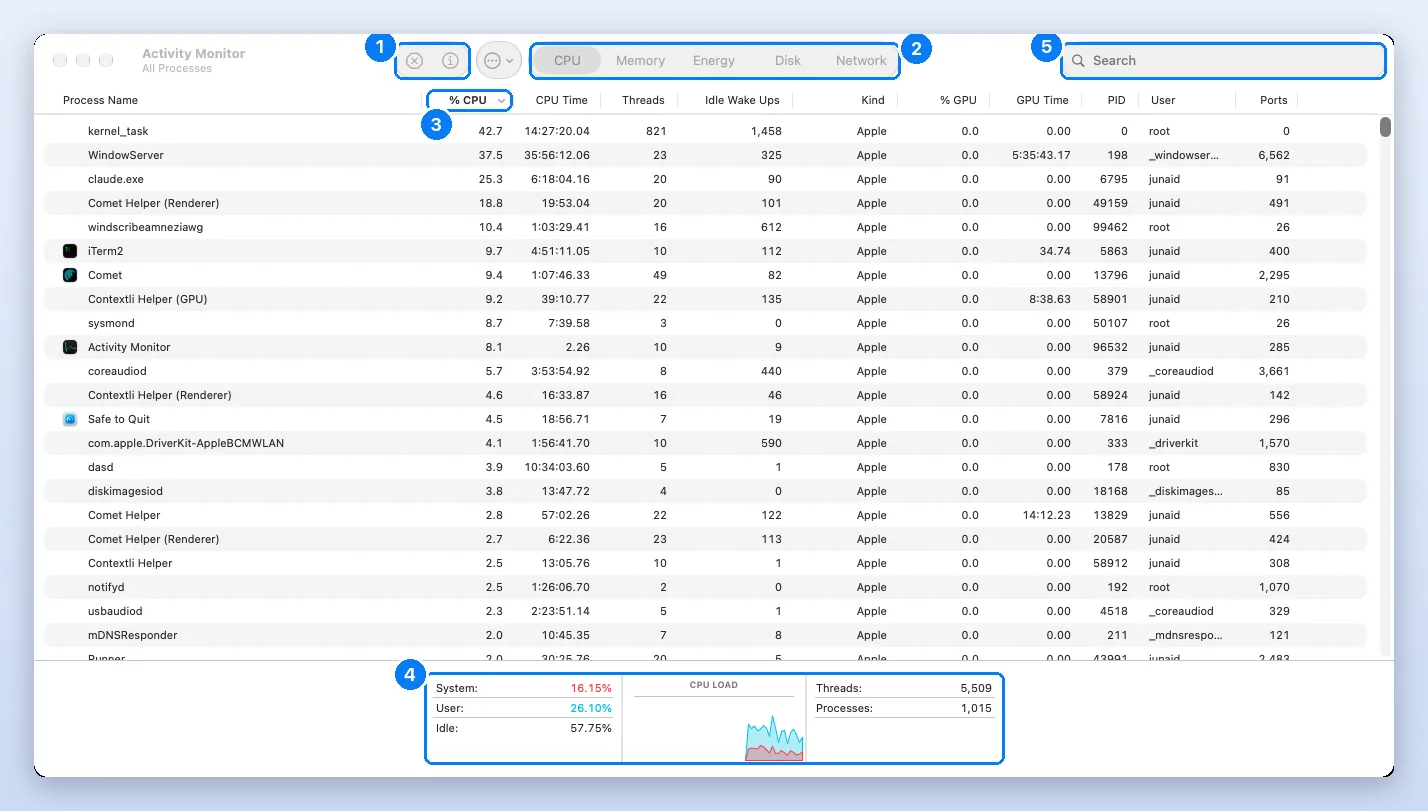
To bring it down: close windows and browser tabs you are not using, unplug a display you do not need, and in System Settings > Accessibility > Display turn on Reduce transparency and Reduce motion (Apple explains both). Do not quit it. Quitting WindowServer ends your login session and closes every open app without saving.
What is kernel_task, and why is it using so much CPU?
kernel_task is the core of macOS itself, so you cannot quit it and there is no file to find. When it shows high CPU, it is usually keeping your Mac cool by holding other processes back:
One of the functions of kernel_task is to help manage CPU temperature by making the CPU less available to processes that are using it intensely.
Apple adds that kernel_task responds to heat “even if your Mac doesn’t feel hot to you”, and backs off when the temperature drops. So the cause is whatever was heating the Mac: a heavy app, a blocked vent, a hot room or a charger that is working hard. In our Activity Monitor screenshot it sat at 42.7% of a core while the Mac as a whole was more than half idle, so nothing needed quitting. If it stays high, find the app above it in the CPU list and close that.
What are mds, mds_stores and mdworker_shared?
They are Spotlight, the Mac’s search, reading your files so it can find them later. mds is the metadata server, mds_stores writes the index, and the mdworker_shared processes read individual files. They are busiest after a macOS update, after you copy in a lot of files and on a new Mac, and they stop on their own. On our test Mac mds_stores averaged 4.0% with a peak of 52.8%. If Spotlight is still busy a day later, or search stops finding things, Apple’s fix is to rebuild the index (Apple’s steps). Howard Oakley’s explainer on Spotlight indexing goes deeper into how the indexing runs in the background.
What are mediaanalysisd and photoanalysisd?
Both scan your photos and videos on the Mac itself, so Photos can find people, places, pets and text, and build Memories. photoanalysisd is “the macOS photo library analysis agent”, in Apple’s words, and mediaanalysisd does the same kind of work for search and Live Text. They run hardest after you import a big library or turn on iCloud Photos, mostly while the Mac is idle and plugged in, and they settle when the library is done. Leaving the Mac awake and charging overnight is the fastest way through it.
What are cloudd, bird, fileproviderd and nsurlsessiond?
They move your data. cloudd syncs iCloud data for apps, bird and fileproviderd keep iCloud Drive and folders such as Dropbox or Google Drive in step, and nsurlsessiond runs downloads in the background for macOS and apps. All four are marked Let it finish: they are busy while something is uploading or downloading and quiet afterwards. If one stays busy for hours, look for a sync that keeps restarting, such as a huge file that keeps changing or a cloud folder that is nearly full.
Is a Mac process a virus? How to check it is really Apple’s
A process with an odd name is almost always Apple’s, and you can prove it in one command. Apple signs every file it ships, and the system folders are sealed: Apple’s security guide says the signed system volume “verifies the integrity of the system content at runtime” and rejects anything without Apple’s signature (Apple Platform Security). We ran the check below on every process in this list. All 342 files we could read are signed by Apple; the one exception, cupsd, can only be read by the system itself.
codesign -dvv /usr/libexec/trustd 2>&1 | grep Authority
Authority=macOS Software Signing
Authority=Apple Code Signing Certification Authority
Authority=Apple Root CAThree signs that a process is not Apple’s: it runs from your home folder, /tmp or /Users/Shared; its name imitates an Apple one with a small change; or codesign shows a developer you do not recognise, or no signature at all. macOS also scans for known malware by itself with XProtect, which Apple describes in its malware protection guide.
How we checked this list
The descriptions are written in plain English for people who do not live in Terminal, and every line was written and checked by hand. Then we tested every entry against a real Mac on 7 October 2026:
- Test Mac: Apple M1 Pro MacBook Pro with 16 GB of memory, macOS 27.0.1 (build 26A434), in daily use.
- Files: we searched the system folders for each process and found 343 of the 369. The other 25 are not on macOS 27.0.1 (older versions, or Macs with other hardware or features, still run them), and
kernel_taskis the kernel itself. - Signatures:
codesignon every file found: 342 signed by Apple, 1 readable only by the system. - How each one starts: we read all 921 launchd job files in the system folders and matched them to each executable.
- Apple’s own words: 195 processes have a manual page with a one-line description, quoted in the list.
- CPU and memory: we sampled every process every 30 seconds for 20 minutes (40 samples) while the Mac was in normal use, and kept only the Apple processes in this list.
- Restart test: we quit two processes that launchd keeps alive and timed how long the new copy took to appear.
We recheck the list after each major macOS update. If you see a process that is missing, the about page explains who writes this site and how to reach us.
Frequently asked questions
How do I list all processes in macOS?
Open Activity Monitor and choose View, then All Processes. In Terminal, ps -ax prints every process and top shows a live list sorted by CPU. Our test Mac had 600 processes running at once, which is normal.
What processes should be running on my Mac?
Hundreds, and most belong to macOS. Apple processes live under /System, /usr, /bin or /sbin and are signed by Apple. Anything you do not recognise can be looked up in the list on this page.
How do I turn off background processes on my Mac?
For apps, open System Settings, then General, then Login Items and Extensions, and switch off the apps you do not need at login. Apple's own background processes cannot be switched off this way, and quitting them only makes macOS start them again.
How do I check what is slowing down my Mac?
Open Activity Monitor, click CPU and sort by % CPU, then click Memory and check the Memory Pressure graph. An app you opened at the top for minutes is the usual cause; a busy Apple process such as mds_stores usually finishes on its own.
Is it safe to quit WindowServer on a Mac?
No. WindowServer draws everything on screen, and quitting it logs you out and closes every open app without saving. Reduce its load by closing windows, unplugging a display you do not need, or turning on Reduce transparency.
Can I quit kernel_task?
No. kernel_task is the macOS kernel. High CPU from kernel_task usually means it is holding other processes back to keep the Mac cool, so find and close the app that is heating it.
Why does a process I quit keep coming back?
Because launchd restarts it. Many Apple processes are marked KeepAlive or start on demand, so macOS starts a new copy as soon as the old one exits or as soon as something needs it. On our test Mac that took about 0.1 seconds.
How do I get memory back on my Mac?
Quit apps you are not using, close browser tabs, and restart the Mac if it has been on for weeks. Do not quit Apple background processes to save memory; macOS manages their memory itself and restarts them.
Junaid is a software engineer who builds native macOS apps, which means he spends his days inside Activity Monitor, Instruments and the Terminal watching how Mac apps use CPU and memory. Before that he worked as an L2 technical support consultant, resolving around 500 escalated customer tickets with a satisfaction score above 95%. He holds a BSc in Software Engineering from NUST. Every step on this site is re-run on a real Mac before it is published.
Sources
- Apple: View information about Mac processes in Activity Monitor
- Apple Support: If kernel_task is using a large percentage of your Mac CPU
- Apple Support: Rebuild the Spotlight index on your Mac
- The Eclectic Light Company: In the background, Spotlight indexing
- The Eclectic Light Company: Why E cores make Apple silicon fast
- launchd.plist manual page (KeepAlive, ProcessType)
- Apple Developer: Creating Launch Daemons and Agents
- Wikipedia: launchd
- Apple Platform Security: Signed system volume security
- Apple Platform Security: Protecting against malware in macOS
- SS64: codesign command for macOS
- Apple: Reduce onscreen motion and transparency on Mac
- Apple: Change Login Items and Extensions settings on Mac